Everything Swarm Agentic can do.
Every feature for running AI coding agents on your own PC, in one plan.
14 days free, then $10 a month. Cancel anytime.
Agents
Bring every agent you already use.
Swarm runs the coding agents you have now, signed in with your own accounts, so there's no second AI bill.
 ChatGPT
 Claude
 Gemini
 Grok
 Meta
 DeepSeek
 Kimi
 OpenCode
One window for every agent
Run Claude Code, Codex, OpenCode and the rest side by side, each in its own conversation.
The plans you already pay for
Each agent signs in with your account at its own company. Swarm never sits between you and your AI bill.
Free and local models
Point OpenCode at a free model, a model running on your own PC, or your own API keys.
Switch agents mid-task
Hand a conversation to another agent. It reads what happened so far and carries on.
Model and effort per message
Pick the model for each request, and how hard it should think: low for quick fixes, max for the tricky stuff.
Presets
Save an agent, model, effort level and permissions under one name, then switch back in a click.
Permission modes
Decide what each agent can do without asking you. Swarm remembers the setting for every project.
Skills and slash commands
Type / in the message box to run any skill your agent knows.
Usage limits
Keep working when a plan runs dry.
Swarm tracks how much of each plan you've used and moves the work before it stalls.
Several accounts per agent
Keep a personal and a work account signed in at the same time.
An account for each project
Client work runs on the work plan. Side projects stay on yours.
Automatic hand-off
When one account hits its limit, the conversation moves to one with usage left, so overnight jobs still finish.
Wait and resume
Prefer to wait? Swarm pauses until the limit resets, then picks the conversation back up on its own.
Usage at a glance
See what's left on every plan and when each limit resets.
Plan advice
If a cheaper plan would cover a month of your usage, Swarm tells you and shows what you'd save.
Conversations
One conversation for each job.
Say what you want done. The agent works on it and tells you when it needs you.
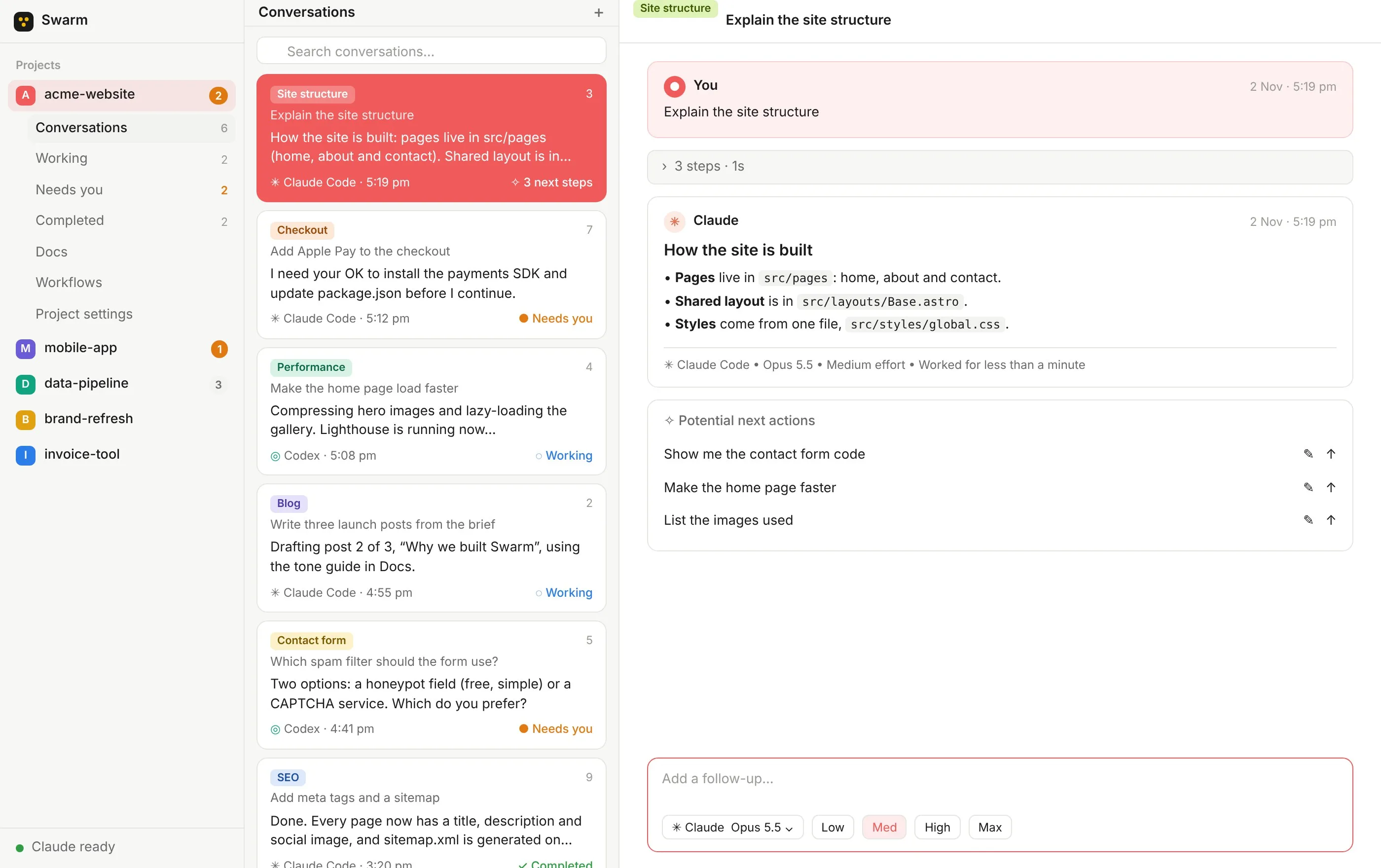
Status cards
Each card shows the start of the latest reply and what the agent is doing right now.
Clear statuses
Working, Needs you, Completed, Stopped and Failed, with counts in the sidebar.
Questions with options
When an agent needs a decision, pick an answer, add a note if you like, and it continues.
Approvals you can read
Check a command or file change as proper code before you allow or decline it.
Queue your next message
Write follow-ups while the agent is busy. Edit, reorder or delete them before they send.
Suggested next steps
Up to three follow-ups after every reply. Send one as it is, tweak it, or run a few in order.
Fork from any message
Start a new conversation from any point while the original keeps going.
@ mentions
Point the agent at a doc, a file, a workflow or another conversation.
Files and screenshots
Drag, paste or attach several files and images at once.
Drafts that stay put
Half-written messages and attachments survive switching away or closing the app.
Labels and pins
Every conversation gets a coloured label. Pin the ones you're watching to the top.
Plain files you own
Every conversation is saved as a Markdown file you can back up or read anywhere.
Watching the work
Look over its shoulder when you want to.
Follow every step an agent takes as it happens, or fold it all away and wait for the answer.
Every step
What the agent reads, changes and runs, and how long each step took.
Its reasoning
Follow the model's thinking as it works through a problem.
Helper agents
Sub-agents get their own group, with live output and a status of their own.
Who did the work
Every reply names the agent, model and effort level, and how long it took.
Stop and redirect
Stop an agent heading the wrong way and tell it what to do instead.
Retry with another agent
If a run fails, Swarm explains why. Retry it, or hand it to a different agent or model.
Projects
As many projects as you like.
Start one from scratch or open a folder you already have.
Unlimited projects and agents
No cap on projects, or on how many agents work in them at once.
Open any folder
Pick up an app you started in another tool and keep building.
Agents in parallel
Several conversations run in one project at the same time, each with its own agent.
Project instructions
Rules that every agent follows in every conversation of that project.
Colours and pictures
Give each project its own colour and image. The window takes on the colour when it's open.
Quick switching
Jump to a project by name or shortcut, straight back to the conversation you left.
Remove without deleting
Take a project out of Swarm and its folder stays exactly where it is.
Docs and files
Write the plan once. Every agent reads it.
Shared docs live beside every file in the project, for you and your agents.
Shared docs
Notes, plans and briefs that you and your agents can both read and edit.
Simple formatting
Headings, lists, to-dos, code and links from the toolbar, or plain Markdown if you prefer.
Every file in the project
A code editor for code, a formatted view for Markdown, and previews for images, audio and video.
Ask about a selection
Highlight code or text and start a conversation with it already quoted.
Never lose an edit
If an agent changes a file you're editing, Swarm shows you and keeps your version safe.
Find and replace
Across docs, Markdown files and workflows, and every replacement can be undone.
Workflows
Automate the jobs you repeat.
Save the instructions once. Run them with a click, or let them run on a schedule.
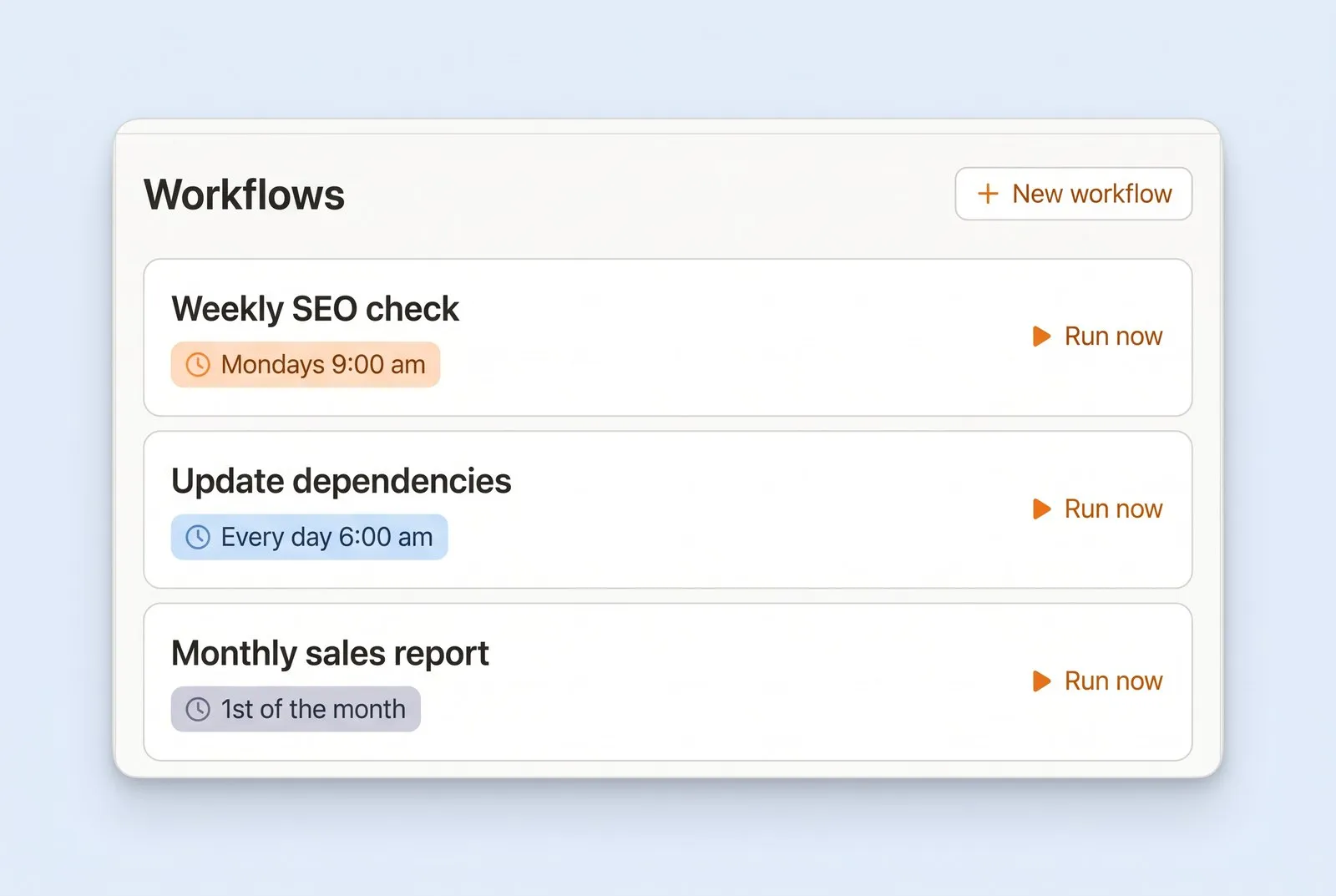
Save once, run any time
Each run gets its own conversation, so you can see exactly what happened.
Schedules
Every day, every weekday, every week, or any custom schedule you need.
Workflow gallery
Ready-made workflows you can read through and add to a project.
Settings of its own
Give a workflow its own agent, model, effort level and permissions.
Chain them together
Mention one workflow inside another and the agent carries on in the same conversation.
Describe it, get it
Explain a routine in plain words and the agent saves it as a workflow, schedule included.
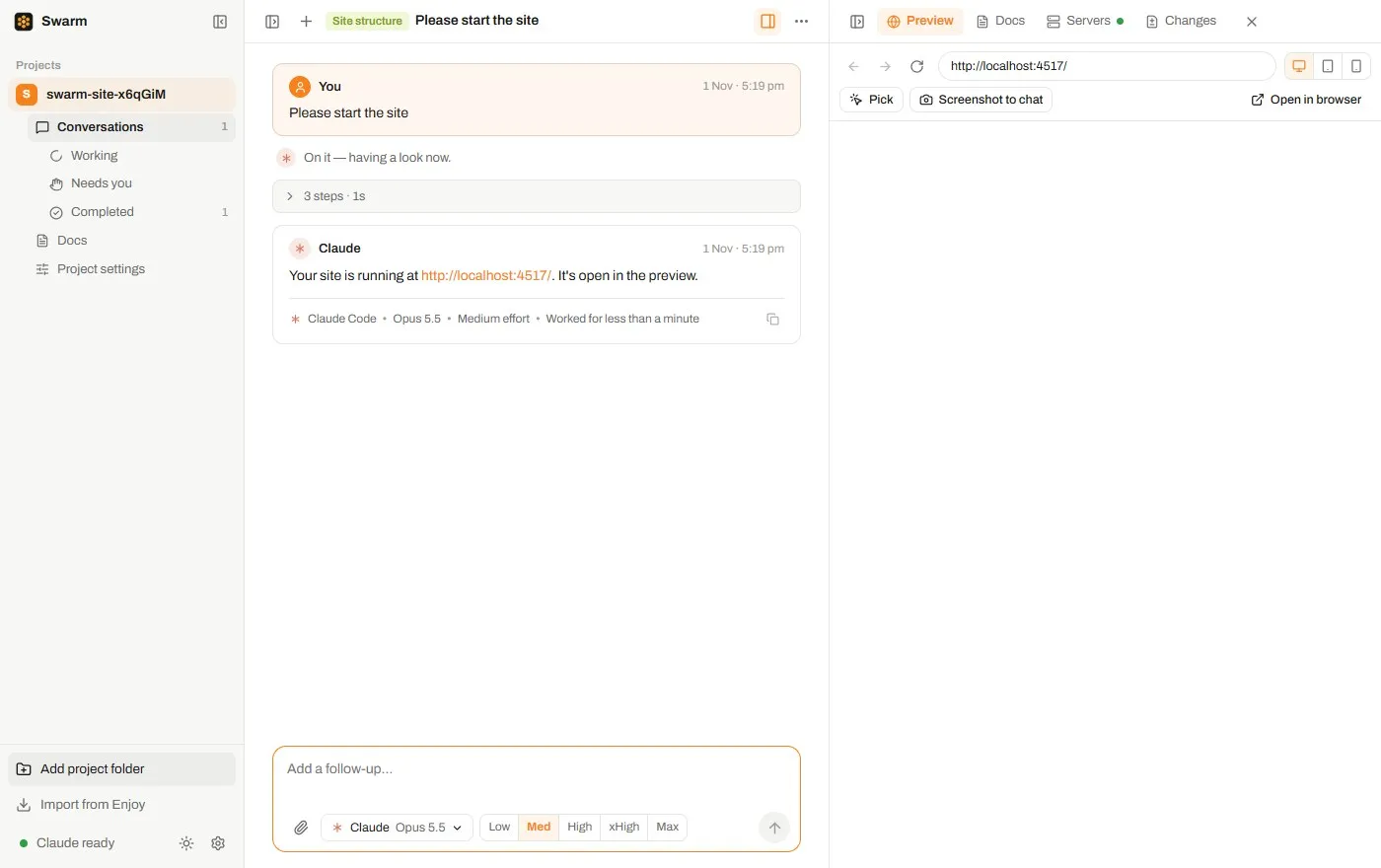
Previews
See it while it's being built.
A browser sits next to every conversation, along with everything your agents leave running.
A browser beside the chat
Your site, live, next to the conversation. Refresh it, go back, or switch to phone width.
Agents check their own work
They read the page, click around and fill in forms to test what they built.
Point at what to fix
Pick any element on the page, or send a screenshot straight into the chat.
Running processes
Every server and program your agents start, with its address and a copy button.
Live output
Read what a process prints as it prints it.
Stop one, or all
Shut down a single process, or everything in a project at once.
Branches
Try ideas without breaking anything.
Branches, commits and worktrees, without needing to learn Git first.
The branch menu
Switch branches, or start a new one, right from the message box.
Commits on request
Ask the agent to save a snapshot, or to commit after every change.
View changes
Every file an agent touched, line by line, full screen if you want.
Push and pull
Sync with GitHub or any remote, with a plain-English reason when something goes wrong.
Worktrees
A separate copy of the project on its own branch, so you can try an idea side by side.
One-click merge
Ask the agent to bring a worktree's changes back, conflicts included.
The app
Made for your Windows PC.
A fast desktop app that keeps you posted without needing to be watched.
Light or dark
Or follow your system setting. Dark mode uses near-black, so your work stands out.
Sounds and notifications
A chime when an agent replies, and a Windows notification that takes you straight there.
In the system tray
Swarm keeps working from the tray with its window closed.
Needs you, first
Conversations waiting on you are counted in the sidebar so nothing sits forgotten.
Keyboard shortcuts
New conversation, find, switch sections and zoom, all from the keyboard.
Updates by themselves
Swarm downloads updates in the background and asks before it restarts.
Privacy
Your work stays on your computer.
Swarm never sees your files or your conversations.
On your PC
Projects, conversations, docs and workflows are stored on your own disk.
Straight to your AI provider
Your messages go directly to the agent's company, never through Swarm's servers.
An account for billing only
Your Swarm account holds your email and subscription, and none of your work.
Anonymous stats, your call
Feature counts with a random ID and never your content. Switch them off whenever you like.
Secure key storage
Sign-ins and keys are kept in Windows' own secure credential store.
A clean slate
Delete all of Swarm's data in one go. Your project folders stay where they are.
Put your agents to work.
14 days free, then $10 a month. Cancel anytime.